XCADEY APP:How do I connect my power meter spider to the APP?
1.Wake up the power meter
Charge the power meter or rotate the chain counterclockwise to activate the power meter.
2.Enable your phone’s Bluetooth
Ensure that the phone’s Bluetooth function is enabled, and allow the XCADEY APP to access Bluetooth permissions in the system settings.
3.Open the XCADEY APP
Go to the APP homepage and click the “Power Meter” module.
4.Search and select the device
The APP will automatically search for nearby available power meter devices.
Find the ID number corresponding to your power meter (XPOWER) in the searching list.
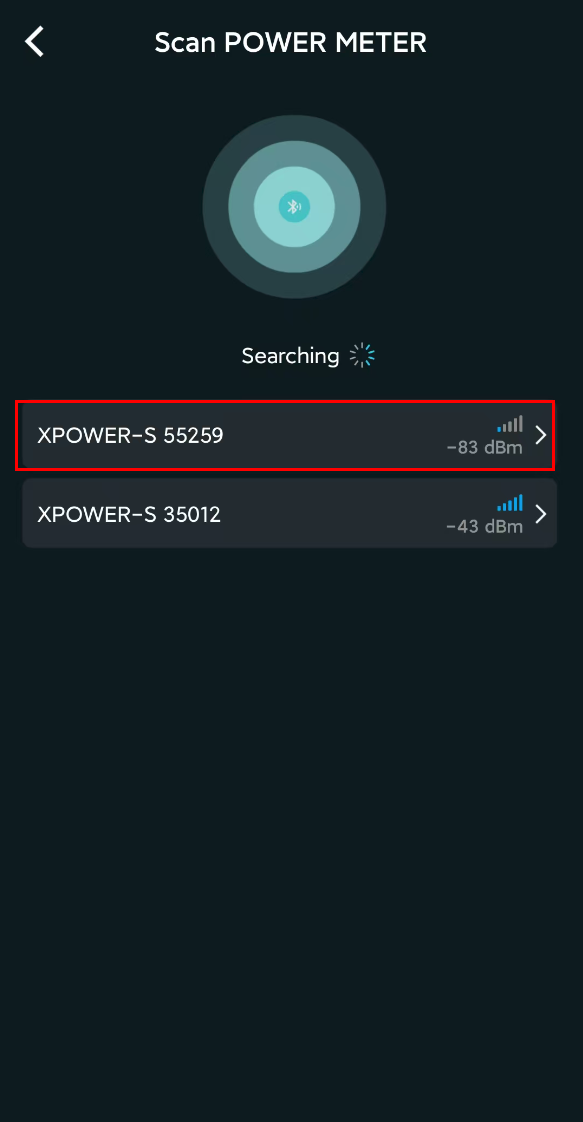
5.Click Connect
Click the device name to complete the connection. After a successful connection, the APP will display real-time power and cadence data during your ride.
⚠️ If the device cannot be found, please confirm that the power meter is activated and not connected to any other Bluetooth devices.