POWER METER: What to do if the power meter spider data is inaccurate?
Please confirm whether calibration has been performed before riding.
If not calibrated, please calibrate via App and bike computer:
–APP: Click [Calibrate] after connection;
–Bike computer: Activate the power meter spider by rotating the chain counterclockwise, then keep the bike stationary, and then calibrate it.
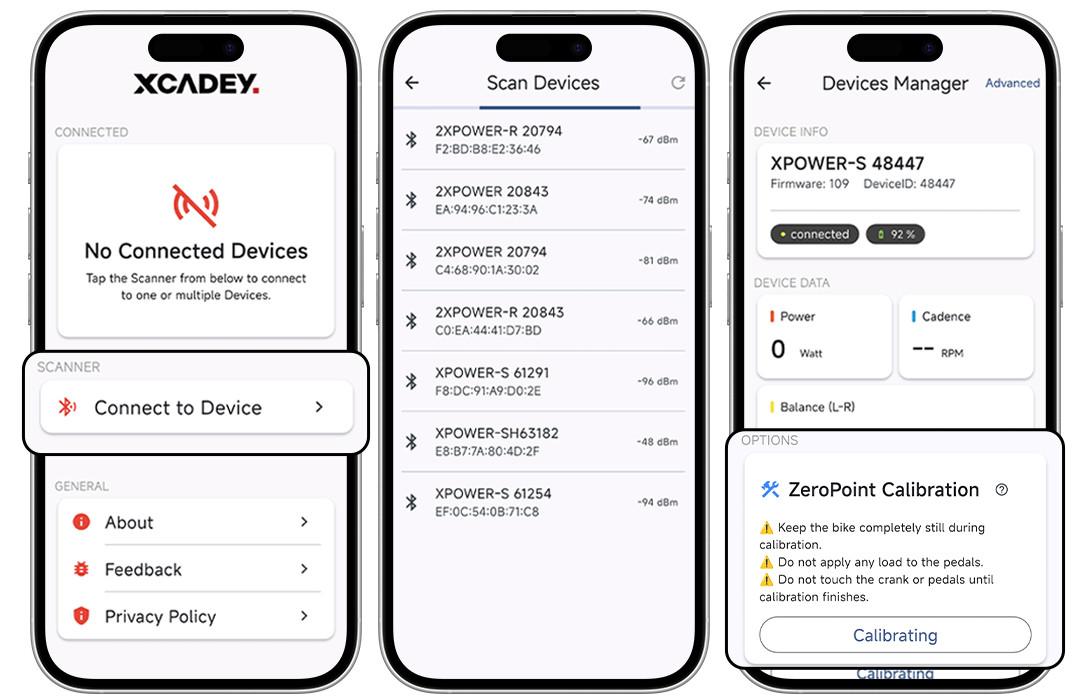
Ride again after calibration and observe whether the data returns to normal.
I have been having the same issues with a gen 2 power meter since purchase though keep getting told the unit is operating correctly which it isnt.
The unit is set to 97% scaling through the app and calibrated through a Wahoo Bolt which returns values between 545 and 569.
The power numbers the unit returns are inaccurate in a number of ways.
#1 it is reading high based on my power numbers from my Favero Assioma though I no longer have them to do an exact comparison.
#2 its is reading higher then my Elite Trainer though the scaling variance changes exponentially the higher the power output. From 0% Variance 100w to 11.5% at 400w. The % it varies is also not linear.
I have fit files of the tests run today.
Scale % Xcadey
Power W 107 162 221 234 267 269 402
Percent Variance% 0 3.81% 8.33% 6.6% 9.75% 6.98% 11.35%
Scale % Trainer
Power W 107 156 202 219 241 250 356
Im not satisfied with the unit and after a number of reviews found online I doubt this issue can be fixed.
I can provide the details of the retailer in Melbourne Aus I purchased the until from and expect a full refund.
Thank you
Hi,
You can contact our after-sales department:
Email: sales@xcadey.com
Whatsapp:+86 189 2419 7081
Best regards,
Jane
I have exactly the same problem. however, even if I try and set power scaling it does not adjust. I can see the xcadey power readings are significantly higher than my trainer which I know is accurate.
Hi,
You can contact our after-sales department:
Email: sales@xcadey.com
Whatsapp:+86 189 2419 7081
Best regards,
Jane