XCADEY BIKE COMPUTER: WHAT DOES EACH BUTTON ON THE ALPHA 800 DO?
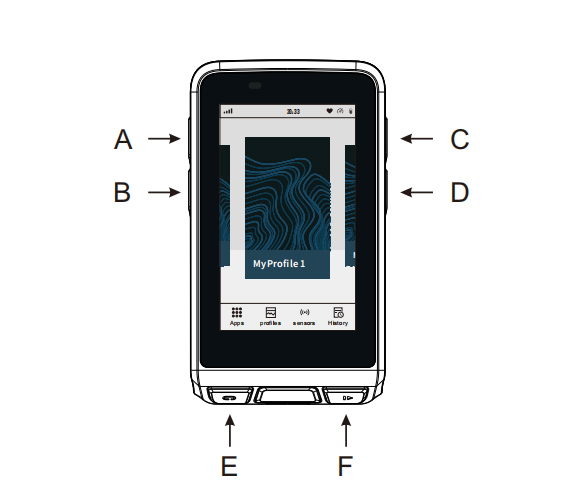
Button A (Power Button)
Long press: Power on / off / Restart
Click on Home Screen: Enter Sleep mode
Click while in sleep mode: Wake up the device
Button B (Back Button)
In menus or other screen: Press to go back to the previous screen.
On the home screen: Press to enter quick settings
Button C (Up Button)
While browsing a menu: Press to scroll up through options
On the home screen: Press to switch cycling modes
While riding: Press to switch left
Button D (Down Button)
While browsing a menu: Press to scroll down through options
On the home screen: Press to switch cycling modes
While riding: Press to switch right
Button E (Ride Control Button)
While riding: Press to record a Lap
On the home screen: Press to open the Menu
Click while riding paused: Save the ride record
Button F (Ride Control Button)
On the home screen: Press to enter “Ready to Ride” screen
Press again: Start riding
While riding: Press to Pause