XPOWER Crank Arm Power Meter: How to solve the DFU mode?
Method 1: Quick Recovery (Recommended)
1.Connect the power meter crank with the charging cable, unplug it after charging for 5 seconds.
2.If the LED light goes out, the device has returned to normal.
Method 2: Restore via the APP
Power Meter Single-side(XPOWER)
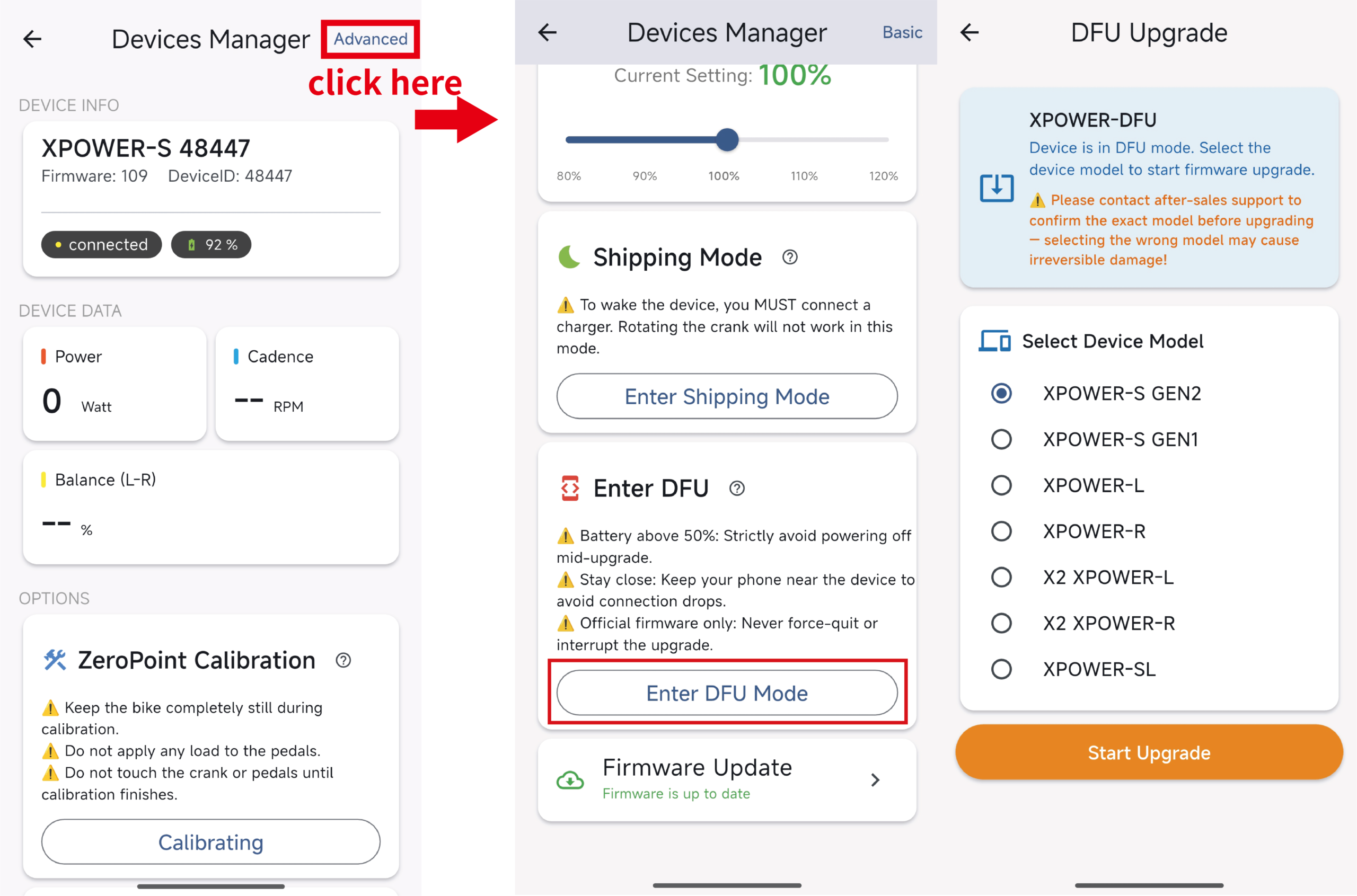
① Enter the XCADEY APP
② Connect the DFU device (Advanced)
③ Select XPOWER or XPOWER-R for upgrade according to the device
(The official firmware version of the power meter single-side is 40.)
Power Meter Dual-side(XPOWER 2X)
① Enter the XCADEY APP
② Connect the DFU device (Advanced)
③ Select the crank side that enters DFU mode:
-Left side enters DFU: Select 2X-L upgrade
-Right side enters DFU: Select 2X-R upgrade
(The official firmware version for both the left and right sides is 34)